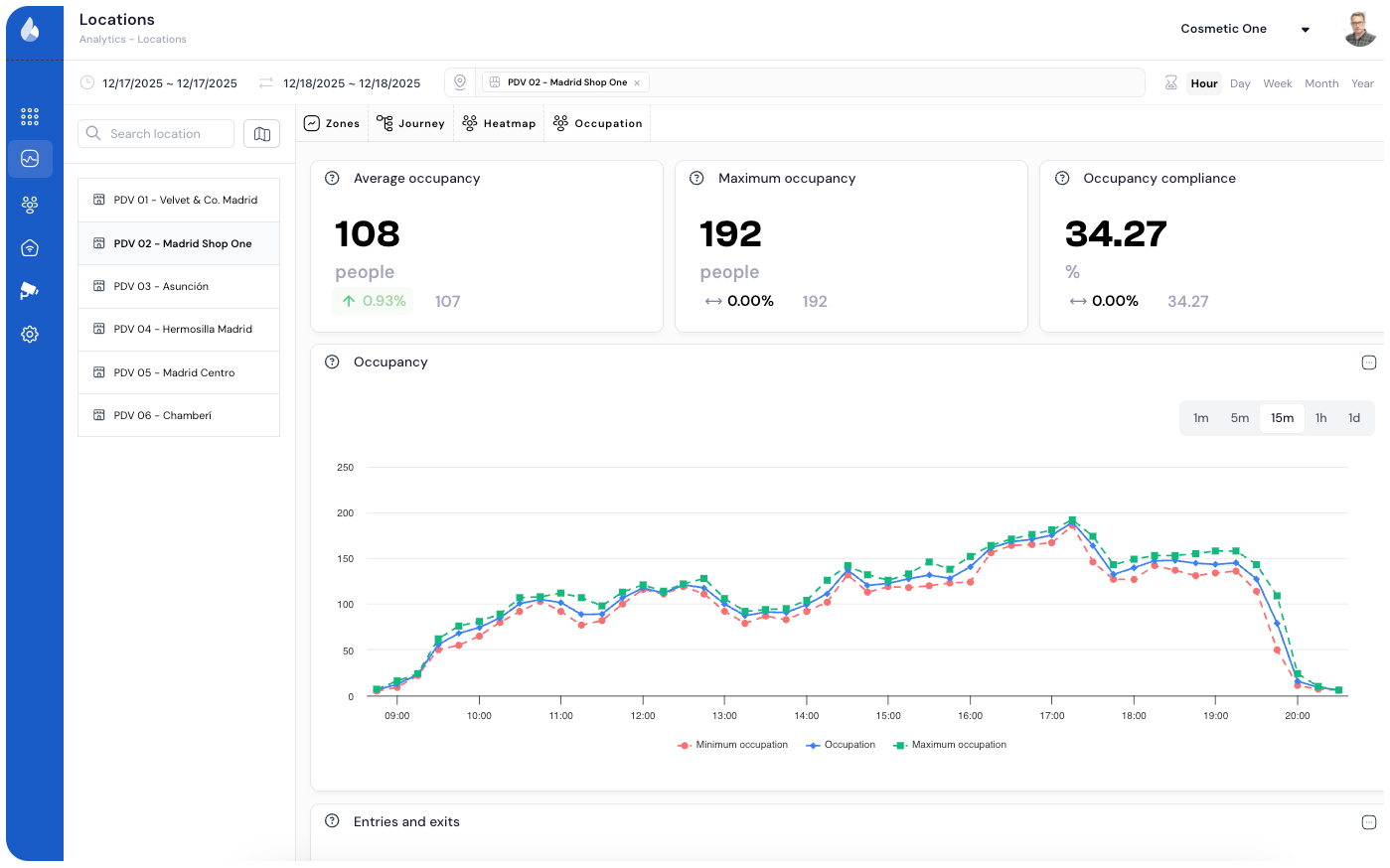
Keep your venues balanced, efficient and safe. Live and historical capacity visibility with privacy-respecting analytics — and automated alerts when thresholds are crossed.
Turn intuition into action plan: where to optimize, when to intervene, and what truly moves the needle.
Real-time occupancy visibility
Monitor live occupancy in venues, floors or zones to keep comfort and safety.
Anticipate demand and adjust
Predict peaks and dynamically adapt staff, cleaning and access policies.
Improve the visitor experience
Avoid crowding and ensure optimal flow for a smoother visit.
Optimize space usage
Analyze patterns to balance resources and reduce idle capacity.
Live visibility, live decisions
0
0
0.00
Flame Occupancy visualizes live and historical capacity levels with accurate, privacy-respecting analytics. Real-time dashboards to track comfort, capacity and flow.
Automate alerts and signage when thresholds are crossed to guarantee efficiency and an impeccable visitor experience.
Real-time occupancy management continuously monitors how many people are inside a physical space, comparing the count against defined capacity thresholds. Flame calculates occupancy by balancing entries and exits recorded by existing cameras, providing an accurate real-time count without identifying any individual. Born as a regulatory requirement during the COVID-19 pandemic, occupancy management has become permanent operational practice because it improves visitor experience (preventing crowding), optimizes resource use (HVAC, cleaning, security based on real occupancy), and meets local capacity regulations. Over 50 shopping malls in Flame's network maintain active occupancy systems, along with stores and other physical spaces.
How do automatic occupancy alerts work?
Flame lets you configure multiple alert thresholds for each zone or building. Typical example: yellow alert at 70% capacity (prepare additional resources), orange alert at 85% (activate flow management protocol), red alert at 95% (restrict entries). Alerts are sent by email, SMS, or integrated with building management systems via API. Real-time dashboards display current occupancy with color coding. For physical spaces, alerts trigger visitor flow protocols; for shopping malls, alerts are configured by floor and zone, enabling granular actions (diverting traffic from floor 2 to floor 3) instead of closing the entire mall. Stores use alerts for crowd management during peak hours. Managers can review alert history to identify patterns and plan preventive measures during high-demand periods.
Does it work with my current cameras?
Yes. Flame connects to existing IP cameras via RTSP protocol to monitor entries and exits. Cameras need to be positioned at access points (entrances/exits) with a top-down or semi-top-down angle for accurate counting. Minimum required resolution: 720p. Compatible with Axis, Hikvision, Dahua, Bosch, Hanwha, and most RTSP-supporting manufacturers. If existing cameras don't cover all access points, Flame performs a technical audit to identify blind spots and recommend the minimum positions needed. In most cases, 80-90% of the necessary cameras are already installed as part of the security system. Typical occupancy deployment—whether for a shopping mall, a store, or any physical space—completes in 5-10 business days.
How does it improve the visitor experience?
Occupancy management improves visitor experience in three ways. First, proactive information: entrance screens display current occupancy levels and the least crowded areas, allowing visitors to make informed decisions. Second, flow distribution: when a zone reaches high occupancy, digital signage can suggest alternative routes, reducing crowding feel—critical in both physical spaces and shopping malls. Third, service optimization: occupancy levels automatically trigger cleaning protocols, opening of additional service points, and security reinforcement. The result is a more comfortable and better-managed space. Flame-network shopping malls that display occupancy data at entrances report 25% higher comfort perception in visitor satisfaction surveys.
Which capacity regulations does it help comply with?
Capacity regulations vary by jurisdiction but are universal across European regulatory frameworks. Spain's CTE (Technical Building Code) establishes maximum occupancy densities by use type—applicable to stores, shopping malls, and all types of physical spaces. Regional governments add specific requirements, many derived from COVID-era regulations that have remained in place. Flame provides the necessary tools: real-time occupancy monitoring by zone, historical records for audits, automatic alerts when approaching limits, and exportable compliance reports. For shopping malls and physical spaces, Flame generates capacity compliance certificates that satisfy municipal inspection requirements and insurance audits.
Does it integrate with building management systems?
Yes. Flame offers API integration with major BMS (Building Management Systems) to automate occupancy-based responses. Typical integrations: HVAC that adjusts ventilation and temperature based on real occupancy, reducing energy consumption by 15-25% across physical spaces, stores, and shopping malls; lighting that activates in occupied zones and dims in empty areas; digital signage that displays occupancy information and alternative routes; and access control systems that restrict entries when thresholds are reached. These integrations transform occupancy management from a monitoring tool into an active building management system. Supported standard protocols include BACnet, Modbus, and REST API.
Request a demo
Discover the power of Flame in just 20 minutes and learn how it can improve the results of your organization.